Wednesday, February 14, 2007

Project Patterns

Creating project patterns in xProcess requires you to think about what are the framework parts of youroverall process. The diagram above shows a project pattern for a variant of Feature-Driven Development (FDD) and it's interesting to see how much of the process has been modeled here and how much elsewhere.

If you read the books on FDD - for example the one by Steve Palmer and Mac Felsing is a good one - you'll see that FDD is classicly drawn as 5 stages: Build a Domain Model; Build a Features List; Plan by Feature; Design By Feature; Buld by Feature. You can see from our pattern diagram that 2 of these stages did not make it into the project pattern. Why is that? There's a simple explanation: the last 2 stages in this description are repeated for each and every feature. These 2 stages are modeled within the Feature pattern so that their activities occur each time a feature is instantiated.

You can also see the project pattern contains the first 2 Timeboxes of the project (subsequent ones will be instantiated from the Timebox pattern). This is also a useful idea: put the parts of the process that you know should happen at the start of every project within the project pattern.

Thursday, January 25, 2007

Can we define custom fields for our tasks?

This a question that is often asked, and one that's important for many reasons but particularly where you are integrating the use of xProcess within an existing landscape of defined tools and processes.

Happily the answer is yes and there are a number of different ways to address the issue for different purposes. Firstly you can use the parameters available in pattern definitions, and use the values given to these parameters when user apply the patterns to set your own fields on elements of the pattern. You can also attach a UserDefinedSchema to a Task (or any other element) which enables editors to know what fields to expect even if they have not yet been set. The Task editor will show these fields in a separate tab entitled with the name you provide. Incidentally elements may hold data even it does not correspond to any current schema so you will not lose data even if UserDefinedSchemas change. You can use the fields you've defined in forms, reports, workflow and other definitions making your data an integral part of the information handled by xProcess.

Friday, December 29, 2006

From tracking to planning ... and back

xProcess provides many of the facilities of an issue tracking tool alongside its project planning/execution and process improvement functionality. Particularly with the new web client access, it's quite possible to use xProcess as your issue tracking server as well as your project execution environment. However many projects and organisation already have issue tracking systems in place and would like to integrate the two systems, allowing issues to transform into tasks in project plans - when they have been classified in the tracker system - and the status of issues to change when progress is reported by the project.

The mechanism xProcess provides for implementing such integrations is the Workflow Server. This can monitor the tracker system as well as changes within the xProcess data source and trigger actions when specific changes are detected. How does this work out in practice? Here's a brief summary of a current integration with a leading tracking tool.
  • The tracker is used to create, modify and review issues
  • xProcess is used for planning and executing the confirmed issues
  • When issues are confirmed, work is planned by instantiating the correspondingpattern (say for a bug-fix) in the appropriate xProcess project. It is the user setting the status to “confirmed” that triggers the transfer into the plan.
  • Updates made to the data in the tracker may cause an alert or update in xProcess and vice versa.
  • When sub-tasks close in xProcess, the plan status in tracker is updated by the Workflow Server. For example states like: Specified, Code complete, and Accepted correspond to particular subtasks being completed and closed in the project.
  • If an issue is deleted or closed in the tracker, data is transferred to xProcess and may cause an alert to the project manager or other flags to be set in the data.
  • Viewing the task in xProcess allows data from the tracker screens to be viewed (and updated) directly. Reverse links also possible.
  • The issue in tracker and its corresponding task or tasks in xProcess are independent objects but with linked lifecycles that are controlled and synchronized through the Workflow Server.
Much of this integration is independent of the particular tool you are using for tracking, so you may find providing your tracker integration can build directly on this work.

Thursday, December 28, 2006

Comparing big patterns and small ones

When defining your processes in xProcess you need to decide on the level of granularity at which to define task patterns and the degree of complexity to build in. Compare these two examples of feature pattern.

This first one is nice and simple. Two people will work on the feature using and/or modifying the three associated artifacts (Word documents in this case) Specification, Design and Test Spec. It's simplicity is its greatest advantage since this allows a lot of flexibility when such features are planned in a real project.

The next pattern is more complex and goes to a finer level of granularity. It defines 5 subtasks, using 4 specific role types and having different artifacts for each of the tasks. The artifacts are a mix of Word documents Wiki pages and xProcess Forms (user-defined data held in internal XML format). The result is a more complex patterns which breaks down the work into more speciifc packages and provides more guidance in terms of the work to be done.

There are dependencies defined on this pattern and there is also a gateway ("Feature complete") which defines the QA requirements for its completion.

This more detailed view of the same pattern shows the allocation of tasks to role types and the specifics of the artifacts.

Which of these two patterns is most appropriate for your projects? I can only recommend you try them and see... and most importantly let me know what you find!

Wednesday, December 27, 2006

What makes processes agile?

The key thing that makes processes agile is "reduction of work in progress". Traditionally, projects' processes view and partition the whole project: for example software development processes that divide the life-cycle into phases like Requirements, High-level Design, Detailed Design, Code and Build, Integration and Testing, Maintenance. Each phase of the project transforms the whole output from the previous phase into the relevant output products for that phase. You could represent such a lifecycle in this way, where each step, T, takes the artifacts, A, from the previous step and delivers them to the next step.


The major problem with this model is that every step must be completed for every part of the project before any delivery (the so-called "big-bang" delivery). There's a lot of work in progress in this model, and that means a lot of risk and a high level of required investment.

In contrast, an agile lifecycle defines the necessary transformations in the process, not for the whole project, but for a single requirement (“features” in FDD, “user stories” in XP, or “use cases” in UP). The release cycle, which is built around the process for delivering single requirements, ensures that benefits can be delivered sooner and in priority order. Should requirements change it no longer involves the loss of such significant amounts of work. At each release there is much less work in progress and value is delivered continually, rather in the single - and very risky - big-bang.

Friday, December 22, 2006

New diagram in xProcess

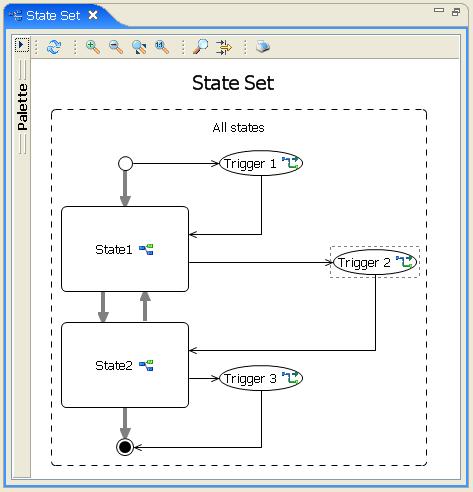
A recent development in xProcess is the support for State Transition Diagrams to define the workflow that is triggered by changes to elements of xProcess data. The diagram attached to this entry is a sneak preview.

You can define states of the elements you are interested in (Tasks, Projects, Peoiple, etc.) by defining a rule in OGNL. When these objects change from one of the pre-defined states to another the Workflow Server will inspect the defined triggers and call the actions defined therein.

More later!

Friday, October 20, 2006

What's in a process?

This is an interesting question - particularly when you're involved in building tools to support them!

In fact the processes behind most projects boil down to
  • what is to be done (tasks, activities, actions),
  • what it is done with (resources, artifacts, tools) and
  • what it is done for or to (products, artifacts and changed status).
Processes can be modularized and if you want to support priority-driven planning - an essential benefit provided by xProcess - you need to build modules of your process - task patterns - around single units of stake-holder benefit (that is around single requirements).

A process need not just address task planning but also aspects such as

  • quality control,
  • artifact management and templates (e.g. for requirements, issues, design and user documentation),
  • workflow (for notification of team participants and for integration with other tools in the environment such as accounting and tracker packages) and
  • human resources concerns such as the definitions of role and skill types.

As organizations grow the libraries of processes behind their projects they can share best practices, evaluate the effectiveness of process changes and optimize their standard approaches to a wide variety of project types. In the mean time, all the projects applying the processes are able to dynamically report status changes, target changes and scope changes achieving both improved agility, and demonstrable compliance and auditability.

If you're defining a process in xProcess here's a list of elements you should be considering:

  • Project patterns - what's the essential structure of projects
  • Task patterns - are their different patterns for things like features, defects , releases
  • Folder patterns - what are the groupings of activities you want to support for planning and prioritising
  • Artifact types - what documents and other artifacts are produced and to what template
  • Role types - what roles do people play
  • Gateway types - are there tasks that need a auditable quality checks applied?
  • Category types - how are tasks and other elements categorised?
  • Expense types - any expenses to build into the process?
  • Actions - are they actions you want triggered by users or events?

Breakout sessions that ensure everyone in the meeting meets everyone else

Lockdown finds us doing more and more in online meetings, whether it's business, training, parties or families. It also finds us spendin...